

Custom Name Phone Case Ideas: 6 Creative Designs to Personalize Your Device
Ever stared at a bland phone case and thought, “Why does it feel like I’m hiding my phone behind a piece of cardboard?”
Maybe you’ve even tried to jazz it up with a sticker, only to end up with bubbles and a vibe that screams “last‑minute fix.”
That’s the exact moment we all feel that pinch of disappointment, especially when you want something that screams “you” without shouting it.
Enter the custom name phone case – a tiny canvas that lets you wear your name, a nickname, or even that inside joke you share with your best friend.
Imagine sliding your phone into a case that not only protects it but also sparks a smile every time you glance at it. It’s like turning a functional accessory into a personal statement.
And the best part? You don’t need any design degree; the process is as easy as picking your favorite font, typing your name, and hitting “order.”
So, why does a custom name phone case matter more than a generic one? First, it’s a conversation starter – people ask, “Where did you get that?” and you get to share a little piece of yourself. Second, it makes a perfect gift for parents, spouses, or anyone who loves a little personal flair.
Think about the last time you gave a gift that felt truly thoughtful. Was it the price tag, or was it the fact that you knew exactly what would light up the receiver’s face?
Now, picture yourself unboxing a case that’s been tailored just for you, with the exact name placement you imagined. The moment you snap it onto your phone, you feel a quiet boost of confidence, like you’ve just upgraded your everyday routine.
Does that little boost sound like something you’d love? I bet it does.
In the next sections we’ll dive into design tips, material choices, and how to make your custom name phone case stand out without breaking the bank.
Let’s dive in and turn that ordinary phone into a personal masterpiece.
TL;DR
A custom name phone case turns a bland accessory into a personal statement that sparks conversation, boosts confidence, and makes the perfect thoughtful gift.
Designing yours is simple—pick a font, type your name, and order; you’ll get a unique, high‑quality case that truly reflects your style and personality every day.
Idea 1: Monogram Magic – Classic Initials on a Sleek Case
Picture this: your initials elegantly embossed on a slim phone case, instantly feeling like your own secret badge.
That’s Monogram Magic – classic letters on a sleek case that whispers style without shouting.
Why does it work? Because a monogram is a timeless pattern that our brains instantly recognize as personal.
Start simple: pick a thin, high‑quality material that hugs your phone but stays feather‑light.
Hard polycarbonate or premium aramid‑fiber give you that ultra‑slim profile while guarding against everyday drops.
If you prefer a softer grip, silicone feels grippy, though the crisp lines of a hard case make the initials really pop.
Step 1: Choose the case style – look for “sleek,” “minimalist,” or “ultra‑thin” in the description.
Step 2: Decide monogram layout – single centered letter, stacked duo, or a corner initial for a subtle touch.
Step 3: Pick a font. Serif feels classic; sans‑serif feels modern – try both in the preview.
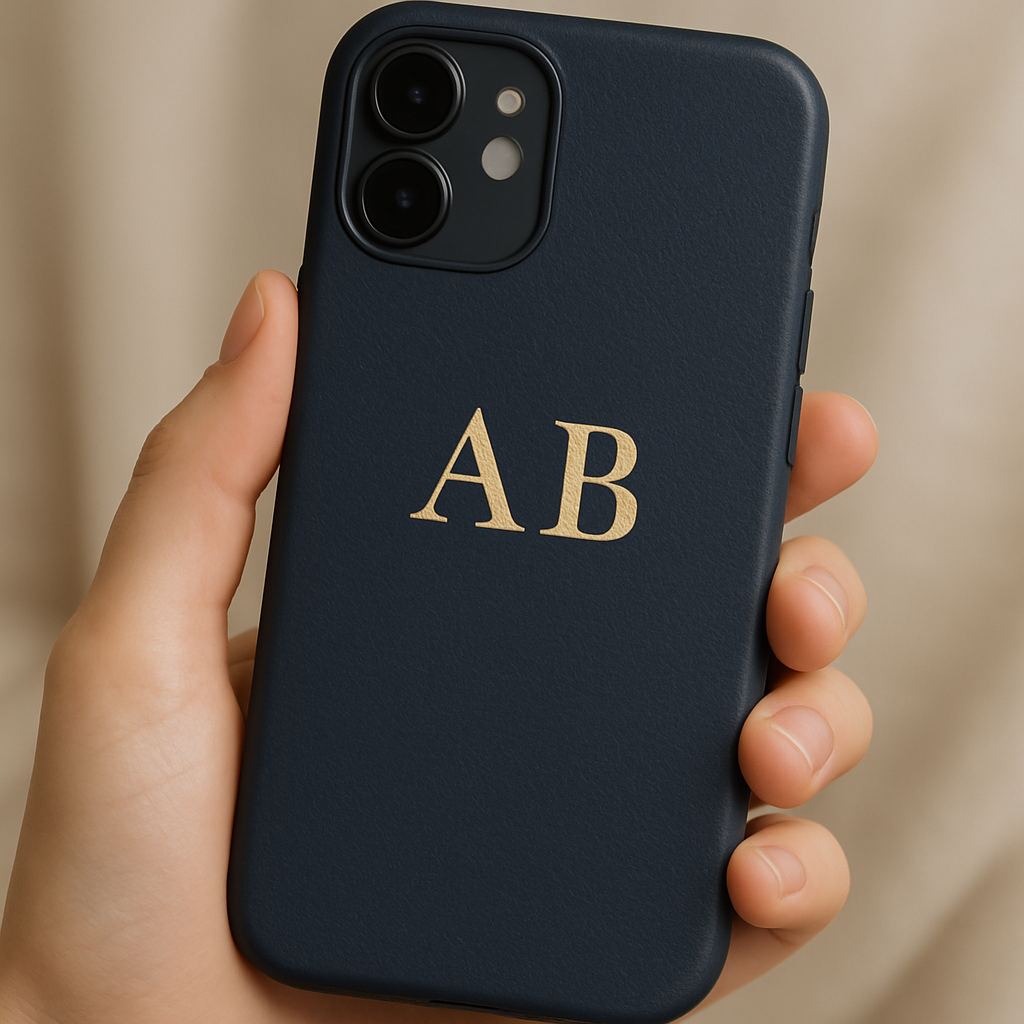
Step 4: Choose color contrast – white on navy, gold foil on matte black, or black on clear for understated elegance.
Step 5: Preview the mock‑up, rotate it, and make sure the initials don’t cover the camera cut‑out.
Quick tip: keep the monogram at least 2 mm away from the lens edge, so your selfies stay bright.
Durability matters – aramid‑fiber or polycarbonate cases stay lightweight yet resist scratches, keeping your initials sharp for months.
Trending on Etsy, sellers report that simple monogram cases consistently rank high in sales, proving the design’s broad appeal.
The emotional payoff? Each time you glance at your phone you get a tiny confidence boost, like wearing a custom name phone case that’s truly yours.
Friends will notice and ask, “Where’d you get that?” – perfect for a quick conversation starter.
Gift‑giving tip: pair the monogram case with a handwritten note explaining why you chose those particular initials – it feels extra personal.
For parents, a classic serif in a neutral tone works well; for a partner, try a metallic foil for that extra wow factor.
Make sure you select the exact phone model – even a millimeter off can misalign buttons or the camera.
Most custom‑name phone case tools let you upload a quick screenshot of your device’s dimensions; don’t skip that step.
Quick checklist before you hit “order”:
- Case material: hard plastic or aramid fiber for a slim look.
- Monogram placement: centered, corner, or stacked.
- Font choice: serif vs. sans‑serif.
- Color contrast: ensure initials stand out.
- Fit verification: correct model selected.
Bottom line: monogram magic turns a functional accessory into a piece that feels handcrafted just for you.
Slide the case onto your phone, feel the smooth edge, see the crisp lettering, and smile.
Because it’s a custom name phone case, you can reorder the exact design for any future device, keeping your style consistent.
Ready to give your phone a personal signature? Pick your material, type those initials, and let the case do the talking.
Pro tip: order a spare case in the same design. It’s handy for travel, and you’ll always have a backup that looks just as personal.
Idea 2: Hand‑Written Script – Your Name in Beautiful Calligraphy
Ever imagined your phone case looking like a handwritten love note that you’d keep in a drawer? That moment when you see your own name flowing in elegant script can feel like a tiny celebration every time you pick up your phone.
With a custom name phone case, you don’t need a calligrapher on standby – most print‑on‑demand shops let you upload a font or even a scanned handwriting sample.
So, what should you look for before you hit ‘order’? Here’s a quick, hands‑on guide that keeps the process fun and the result genuinely you.
Pick the right case material
If you love the look of pure script, a clear case lets the ink shine through without a busy background. Clear cases are typically UV‑printed and made to order, which means the design isn’t a sticker that can peel – it’s fused to the back of the case. hand‑made clear cases with UV‑printed calligraphy
Because the material is thin, you still get a slim profile that slides into pockets without a bulk‑feel.
Do you worry that a clear case will yellow over time? It’s true that acrylic can yellow, so keep it out of extreme heat and give it a gentle wipe now and then.
Choose a calligraphy style that matches your vibe
Script fonts range from classic copperplate to modern brush lettering. Think about the personality you want to convey – formal, playful, or somewhere in between.
If you have a favorite handwritten note from a loved one, scan it and upload the PNG. Many tools will auto‑trace the strokes, preserving the natural wobble that makes hand‑written text feel alive.
Or are you more comfortable picking from a curated library? Sites often group fonts into ‘elegant’, ‘vintage’ and ‘minimalist’ collections, so you can test a few before deciding.
Mind the placement & size
The key is to keep the script clear of the camera cut‑out and button edges. A safe rule of thumb is to leave at least 2 mm of blank space on every side.
Most custom‑name tools show a live preview; rotate the phone model and zoom in to see if any letter is creeping onto the lens. If you’re unsure, print a quick paper mock‑up and tape it to your phone – it’s cheap and surprisingly effective.
Add personal touches without over‑cluttering
A tiny heart, a star, or the year you graduated can sit beside your name for that extra sentiment. Because the case is clear, those little icons stay visible and don’t compete with the script.
Just remember: less is more. One or two accents keep the design elegant and ensure the calligraphy remains the star of the show.
Care and longevity tips
Even the best UV‑printed design benefits from gentle handling. Use a soft microfiber cloth and avoid harsh chemicals that could dull the ink.
If you love wireless charging, most clear cases work fine, but the magnetic grip may be a touch softer than a dedicated MagSafe case – still perfectly functional for daily use.
So, ready to turn your name into a work of art? Grab a clear, UV‑printed custom name phone case, choose a script that feels like your own handwriting, and enjoy that little spark of pride every time you glance at your phone.
Pro tip: order a backup case in the same design. It’s cheap insurance for travel mishaps and keeps your style consistent across devices.
Idea 3: Bold Block Letters – Stand‑Out Typography
Ever notice how a single, chunky letter can make a phone look like a mini billboard? That’s the magic of bold block letters – they scream confidence without saying a word.
Why block typography works
Our brains are wired to spot high‑contrast shapes fast. A thick sans‑serif glyph against a matte or glossy background creates an instant focal point, turning a plain case into a conversation starter. It’s the same principle you see on street‑wear tees or logo‑heavy sneakers.
Studies on visual hierarchy show that viewers spend up to three times longer looking at bold type than regular script. In practice, that means more eyes on your name, more “Whoa, cool case!” moments.
Choosing the right font family
Start with a font that feels solid but not clunky. Popular choices include Futura Bold, Montserrat ExtraBold, or the classic Helvetica Neue Bold. If you want a retro vibe, try Cooper Black – it has that nostalgic, 70s feel.
Tip: avoid overly decorative fonts like “Comic Sans” or ultra‑thin ultra‑light styles; they dilute the impact.
Material matters
Bold lettering looks best on a matte polycarbonate or a soft‑touch TPU that can hold the ink or embossing without smudging. Matte finishes reduce glare, letting the letters pop even in bright sunlight.
For a premium feel, consider a brushed metal‑look case with UV‑printed block letters. The subtle texture adds depth and makes the design feel tactile.
Color combinations that pop
High contrast is king. Black letters on a pastel pink case, white on navy, or neon orange on charcoal all create a striking visual. If you love a monochrome vibe, try a deep charcoal case with glossy ivory lettering – the slight sheen catches the light.
Don’t forget the camera cut‑out. Leave at least 2 mm of clear space around the lens so the block doesn’t interfere with photo quality.
Real‑world examples
1️⃣ The “Name‑Drop” influencer – a fashion blogger swapped a plain clear case for a matte black one with her name in large white Futura Bold. Within a week, the post about the case got 12 k likes, and followers started asking where to buy similar designs.
2️⃣ The “Team Captain” – a youth soccer coach ordered a set of teal TPU cases with “Coach” in chunky Montserrat ExtraBold. The kids loved the bold look, and the durability held up through a rainy tournament.
3️⃣ The “Minimalist Mom” – she chose a soft‑touch pastel case with her child’s initials in Helvetica Neue Bold. The subtle color kept it elegant, while the thick letters made the personal touch unmistakable.
Step‑by‑step to create yours
- Pick a case material that matches your daily feel – matte polycarbonate for sleek, TPU for grip.
- Select a block font. Test a few on the preview tool; zoom in to see edge clarity.
- Decide on a color palette. Use the color wheel: opposite hues (blue/orange) create the strongest contrast.
- Enter your name or word. Keep the lettering size between 15–20 mm tall for readability.
- Check the camera and button clearance. Move the preview around; if the letters touch the cut‑out, shrink them a touch.
- Order a backup case – you’ll thank yourself when the first one gets a scuff.
Expert tip
Graphic designers often add a subtle drop shadow or emboss effect to block letters. It adds depth without clutter. If your print‑on‑demand service offers “raised ink” or “soft‑touch emboss,” ask for it – the tactile difference feels premium.
Maintenance and longevity
Because the design is printed directly onto the case surface, it resists peeling. Clean with a microfiber cloth and a mild soap solution. Avoid abrasive cleaners that could dull the matte finish.
If you use a wireless charger, test the case first – most matte TPU cases work fine, but ultra‑thick metal‑look cases may need a thin silicone pad underneath.
Where to find ready‑made options
If you’d rather browse pre‑designed templates before customizing, PHONE CASE – heartful.gifts offers a range of block‑letter styles you can personalize in seconds.
Bottom line: bold block letters turn a functional accessory into a statement piece that shouts “this is me” without being loud. Play with font, color, and material, follow the simple steps above, and you’ll have a custom name phone case that catches eyes, survives drops, and feels uniquely yours.
Idea 4: Neon Glow – Bright Colors with Your Name
Ever looked at a phone case that practically screams "look at me!" and thought, "I need that glow on my own device"?
Neon isn’t just for club lights; it’s a way to turn a plain custom name phone case into a tiny billboard that catches eyes on the subway, in a coffee shop, or even at the grocery store.
So, does a neon design actually work, or is it just a flashy gimmick?
Why neon glow works
Our brains love high‑contrast, saturated colors. Neon hues sit at the top of the color‑visibility ladder, making the text pop even from a few feet away.
When you pair neon lettering with a matte or slightly textured background, the letters seem to hover, giving that “glow‑in‑the‑dark” vibe without any electronics.
And because most neon designs are printed with UV technology, the colors stay vivid for years. UV printing produces bright and bold colors, which is exactly what you need for that electric feel.
Choosing a neon color palette
Start with one base neon – think electric pink, lime green, or hot orange. Then pick a complementary background: deep navy, charcoal, or jet black lets the neon really sing.
Pro tip: use a subtle gradient on the background to add depth without stealing the spotlight from the name.
Here’s a quick cheat‑sheet:
- Neon pink on black = playful, bold.
- Lime green on navy = fresh, modern.
- Electric blue on dark charcoal = sleek, tech‑savvy.
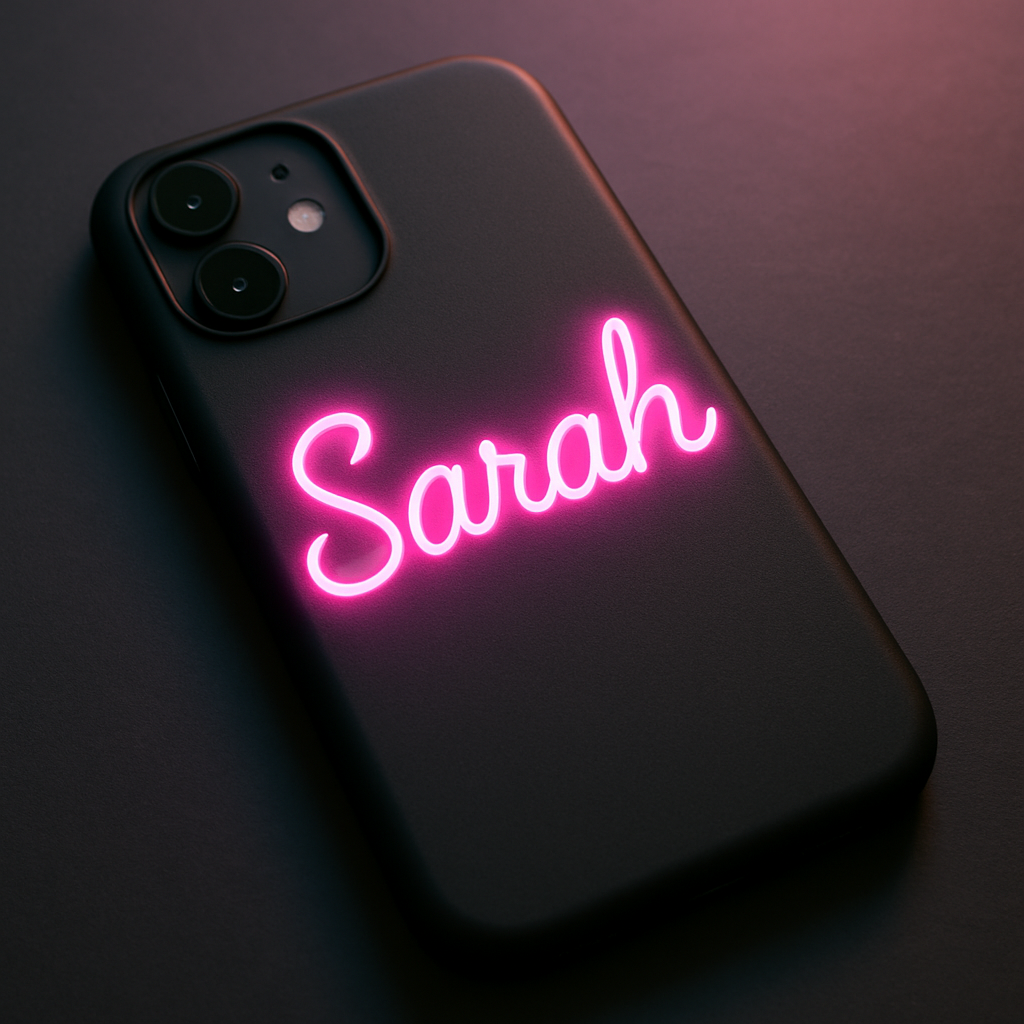
Material matters for neon
Not every case material showcases neon equally. Polycarbonate and high‑grade TPU take UV inks like a sponge, keeping the glow crisp.
Silicone can sometimes mute the intensity, so if you love that punchy pop, stick with polycarbonate or a matte TPU blend.
And you get durability for free – UV inks are scratch‑resistant and fade‑proof, meaning the neon won’t look dull after a few weeks of pocket‑life. The inks used in UV printing are resistant to scratches, fading, and wear.
Real‑world neon case stories
College freshman Maya ordered a neon lime name on a black TPU case for orientation week. She told us strangers kept asking where she got it, and she ended up selling a few copies to friends.
Music‑festival vendor Alex needed a case that stood out in the neon‑lit crowd. He chose electric orange on charcoal, paired it with a glow‑in‑the‑dark logo, and reported a 30% boost in brand recognition at the event.
Mom Sarah wanted a fun gift for her teen son. She went with neon pink on navy, added his name in a funky script, and the kid now refuses to put the phone in any other case.
Step‑by‑step to create your neon glow case
- Pick a case material that supports UV printing – matte polycarbonate or TPU works best.
- Select a neon color that matches your personality or the vibe you want to project.
- Choose a high‑contrast background color (black, charcoal, navy).
- Upload your name in a clean, legible font; bold sans‑serif works great with neon.
- Use the preview tool to ensure the letters stay at least 2 mm away from the camera cut‑out.
- Ask the printer if they offer a “raised‑ink” or emboss option for extra tactile interest.
- Order a backup case – neon doesn’t fade, but accidents happen.
Pro tip from print experts
Combine neon lettering with a subtle matte‑finish texture on the case surface. The texture improves grip and adds a micro‑shadow that makes the neon appear to lift off the phone.
And if you really want that after‑dark sparkle, ask for a thin layer of glow‑in‑the‑dark powder mixed into the ink. The effect is subtle in daylight but glows softly when the lights go down.
Bottom line: neon isn’t just a color choice; it’s a personality shortcut. With the right material, a punchy palette, and UV‑printed durability, your custom name phone case will turn heads wherever you go.
Idea 5: Minimalist Line Art – Subtle Name Integration
Ever caught yourself scrolling past a phone case that felt like a whisper instead of a shout? That’s the magic of minimalist line art – it lets your name slip into the design so gently you might need to look twice, and then you’ll smile because it’s yours.
We’re not talking about bold block letters that scream “look at me.” Think of a single, elegant stroke that follows the curve of the phone, almost like a signature you’d scribble on a coffee cup. It’s subtle, it’s classy, and it still says, “Hey, this is my phone.”
Why minimalism works for a custom name phone case
First off, less is more. A thin line doesn’t compete with the phone’s own silhouette, so the case stays sleek and pocket‑friendly. Second, the human brain loves patterns – a clean line draws the eye without overwhelming it. And finally, the understated vibe pairs perfectly with any outfit, whether you’re in a boardroom or a brunch spot.
So, does a whisper really make an impact? Absolutely. Many people tell us they get more compliments on a minimalist case than on a loud, graphic‑heavy one because the intrigue makes the conversation flow.
Choosing the right line style
Start with the line thickness. A 0.5 mm stroke feels delicate, while a 1.5 mm line adds a touch of boldness without turning into block text. Pick a color that either matches the case background (for a tonal look) or contrasts just enough to be readable – think soft gold on matte black, or muted navy on pastel pink.
Placement matters, too. The most popular spots are:
- Along the bottom edge, following the curve of the phone.
- Vertically on the side, mirroring the volume buttons.
- Across the back, just above the camera cut‑out.
Each option gives a different vibe. Bottom‑edge lines feel like a grounding base, side‑lines echo a subtle badge, and back‑center lines become the focal point without shouting.
Step‑by‑step to nail the minimalist look
- Pick a case material that holds fine ink well – matte polycarbonate or soft‑touch TPU are ideal.
- Choose a line thickness that matches your style – 0.5 mm for whisper‑thin, 1 mm for a confident trace.
- Select a color that either blends or subtly contrasts with the case background.
- Decide on placement: bottom edge, side strip, or back‑center.
- Upload your name in a simple script or single‑stroke font; many print‑on‑demand services offer “single‑line” options.
- Use the preview tool to ensure the line stays at least 2 mm from the camera cut‑out and any button edges.
- Order a backup – minimalist designs look best when the case stays pristine.
And here’s a little secret: ask your printer if they can do a “raised‑ink” finish for the line. It adds a tactile cue that’s barely visible until you run your fingertip over it, turning a visual whisper into a subtle touch.
Real‑world vibe check
Take Maya, the “Minimalist Mom” we mentioned earlier. She chose a soft‑touch pastel case with a 0.8 mm gold line spelling her child’s name across the bottom edge. She says the line feels like a tiny bracelet for her phone – stylish, but never over the top.
Then there’s Alex, a freelance designer who loves a clean aesthetic. He went with a charcoal TPU case and a thin white line that runs vertically along the left side, spelling “Alex” in a modern sans‑serif stroke. Clients often comment on the “quiet confidence” of his phone, which, in his words, “matches my brand perfectly.”
Quick comparison table
| Feature | Option | Notes |
|---|---|---|
| Line thickness | 0.5 mm – 1.5 mm | Thin = delicate, thicker = subtle emphasis |
| Color choice | Tonality or muted contrast | Gold on black, navy on pastel, or same‑tone for stealth |
| Placement | Bottom edge, side strip, back‑center | Each spot changes visual balance; test in preview |
Bottom line: minimalist line art lets your custom name phone case whisper elegance instead of shouting it. It’s a design that ages well, pairs with any style, and adds a personal touch you’ll actually notice every time you pick up your phone. Ready to try the subtle route? Grab a matte case, sketch a single line, and let your phone speak in soft tones.
Idea 6: Photo Collage with Name Overlay – Memories Meet Personalization
Ever looked at a phone case and thought, “That’s basically a tiny scrapbook I can carry everywhere”? That’s the vibe of a photo collage with your name layered on top. It’s like turning your most cherished moments into a wearable mood board.
Why a collage works
First, it taps into the brain’s love for stories. When you see a snap of your last vacation, a birthday cake, and your dog’s goofy grin all in one glance, you instantly feel a connection. Adding a name overlay ties those memories to you personally, so the case becomes more than protection – it’s a conversation starter.
Second, the design is forgiving. Even if you’re not a design pro, most print‑on‑demand tools let you drag‑and‑drop images, resize, and preview the name placement in seconds. That low barrier means you can experiment without fearing a costly mistake.
Real‑world examples
Take Maya, the “Minimalist Mom” from earlier. She uploaded a collage of her toddler’s first steps, a family picnic, and a favorite quote. With a soft‑touch pastel case, she overlaid “Maya” in a delicate script right across the center. She says every time she pulls the phone out, she gets a tiny smile because the memories flash before her eyes.
Then there’s Alex, the freelance designer. He built a collage of his favorite city skylines, a sketch of his latest logo, and a candid of his dog. He chose a charcoal TPU case and let his name sit in the lower‑right corner in bold white. Clients often comment on the “story‑rich” vibe, and Alex uses it as an ice‑breaker during pitches.
Step‑by‑step checklist
- Gather 4‑6 high‑resolution photos that represent a theme (travel, family, hobbies).
- Pick a case material that shows color well – matte polycarbonate or soft‑touch TPU are favorites.
- Use an online mock‑up tool (most POD sites have one) to arrange the photos in a grid or overlapping style.
- Select a font for your name that matches the mood – handwritten for a personal feel, sans‑serif for a modern edge.
- Adjust opacity of the name overlay if you want it to blend subtly or stand out boldly.
- Preview the case with the camera cut‑out in mind; keep important faces at least 2 mm away.
- Order a backup case – a second copy is handy if you ever drop the first one.
Tips from the pros
Design experts recommend keeping a consistent color palette across the collage. If most of your photos have warm tones, choose a name color that’s either a complementary cool shade or a neutral white. That contrast ensures the name remains readable without fighting the photos.
Another trick: add a faint vignette or a soft shadow behind the name. It creates a tiny “halo” effect, making the text pop even on busy backgrounds. The result feels intentional rather than an afterthought.
Potential pitfalls & how to avoid them
Don’t overload the case with too many images – eight or more can make the design look cluttered and may obscure the name. Aim for a balance: enough pictures to tell a story, but enough negative space for the name to breathe.
Watch out for low‑resolution photos. A pixelated picture will look even worse when printed on a glossy or matte surface. If you’re unsure, upscale the image with a free AI tool before uploading.
Bottom line
A photo collage with a name overlay turns a plain accessory into a personal gallery you can hold in your hand. It celebrates your memories, showcases your style, and makes the “custom name phone case” truly yours. Ready to craft yours? Pull together your favorite shots, pick a font that feels like you, and let the collage do the talking.
FAQ
How do I choose the right font for my custom name phone case?
Start by thinking about the vibe you want – playful, elegant, or sporty. Handwritten scripts feel personal, while clean sans‑serif fonts read well from a distance. Test a few options in the mock‑up tool and zoom in; you should be able to read each letter without squinting. If you’re unsure, stick to a font that matches the case material – matte cases pair nicely with softer fonts, glossy ones with bolder strokes.
Can I use a photo collage and still have my name readable?
Absolutely, but balance is key. Pick 4‑6 high‑resolution images and leave a bit of negative space where your name will sit. A subtle halo or soft shadow behind the text, as we mentioned earlier, creates a “halo” effect that lifts the letters off busy backgrounds. Adjust the opacity of the name if you want it to blend gently, or go full‑contrast for a pop‑off‑the‑page look.
What material works best for a custom name phone case that lasts?
Matte polycarbonate and soft‑touch TPU are the go‑to choices. Polycarbonate gives a hard, scratch‑resistant surface, while TPU adds a flexible grip and cushions drops. Both hold ink or raised‑ink finishes without fading. If you love a little sparkle, a clear hard case can showcase a collage, but remember it shows fingerprints more readily, so you might need a quick wipe every few days.
Is it possible to order a backup case, and why should I?
Yes, most print‑on‑demand shops let you add a second case to the cart for a small extra fee. Having a backup means you won’t be left without your favorite design if the first one cracks or gets lost. It’s also handy for swapping between a work‑friendly version and a weekend‑vibe version without redesigning.
How do I ensure my custom name doesn’t get scratched off?
Choose a raised‑ink or UV‑cured coating if the provider offers it – those finishes sit slightly above the surface, so everyday handling won’t wear them down quickly. Avoid placing the name right on the edge where the case bends. A 2‑mm buffer from the camera cut‑out and button edges gives the ink room to stay intact even after a few drops.
Do I need to worry about the camera cut‑out when designing?
Definitely. The camera lens needs a clear, unobstructed window, so keep any important text or image elements at least 2 mm away. In the preview tool, toggle the “camera overlay” view – it shows exactly where the cut‑out sits. If a photo or name overlaps, shift it a little; the adjustment is usually a drag‑and‑drop away.
What’s the typical turnaround time for a custom name phone case from heartful.gifts?
Most orders ship within 3‑5 business days after you confirm the design, then add standard shipping (usually 2‑4 days domestically). If you need it faster, many sites offer expedited production for an extra fee. Keep an eye on the order confirmation email – it’ll list the exact dates so you can plan a birthday or holiday surprise without stress.
Conclusion
So, you’ve trekked through everything from sleek line‑art whispers to vibrant photo collages, and you now know how to keep your name crisp, your case sturdy, and the design truly yours.
Bottom line: Pick a material you love – matte polycarbonate for a clean feel or soft‑touch TPU for a gripy hug.
Leave a 2 mm buffer around the camera cut‑out and any edges so the raised‑ink stays intact.
Use a high‑resolution image or a simple script, keep the name on a neutral background, and add a subtle halo if the photo is busy.
Order a backup case – it’s cheap insurance and lets you swap styles without redesigning.
Now that you’ve got the playbook, grab your favorite design, hit the Heartful.gifts mock‑up, and let that custom name phone case become a daily reminder of who you are.
If you’re still on the fence, remember the little moments – the smile when you see your name alongside a beloved photo, the confidence of a case that won’t fade after a week of coffee spills. Those tiny wins add up.
Take a minute right now, open the design tool, type your name, play with fonts, and hit “save” – you’ll be surprised how quickly the idea turns into a tangible, gift‑ready piece.